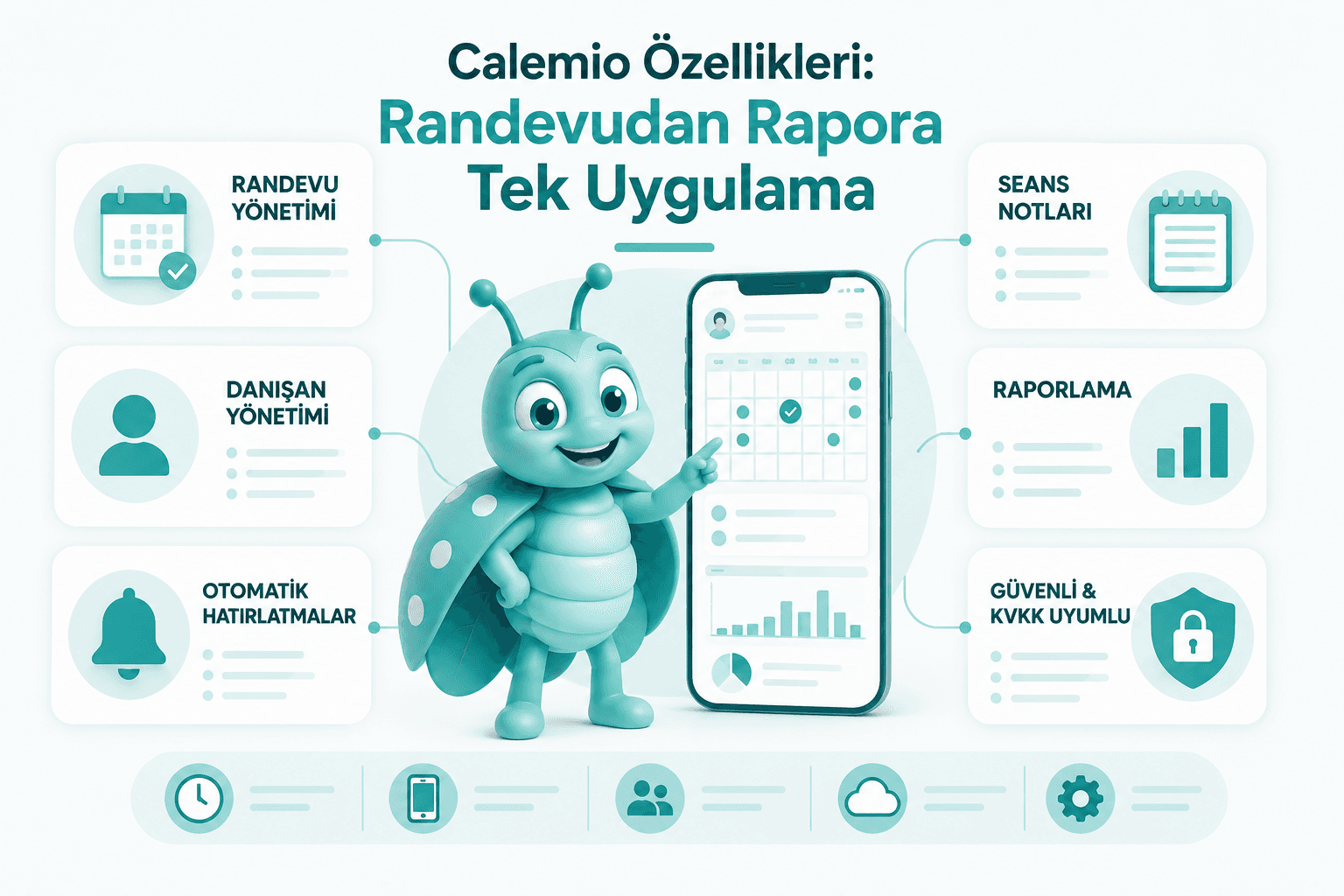
For most business owners, the tiring part of the day isn't the work itself. It's everything around it. Booking an appointment takes five minutes. Reminding the client, confirming it, chasing the no-show, matching a scribble in your notebook to a name in your phone, adding it all up at the end of the month to answer "so how did we do?" That's where the real load sits.
Calemio was built to take that load off your hands. For any business that runs on appointments (a salon, a clinic, a studio, an office, a workshop, it makes no difference) it pulls scheduling, client messages, records, and reporting into one flow. Here's the feature tour, category by category, in plain terms.
The short version
Calemio brings the calendar, online booking, automated reminders, the AI assistant Mio, digital client records, form and note templates, and revenue reports together in a single appointment and business-management app. It runs on iOS, Android and the web, in real-time sync.
Calendar and Scheduling
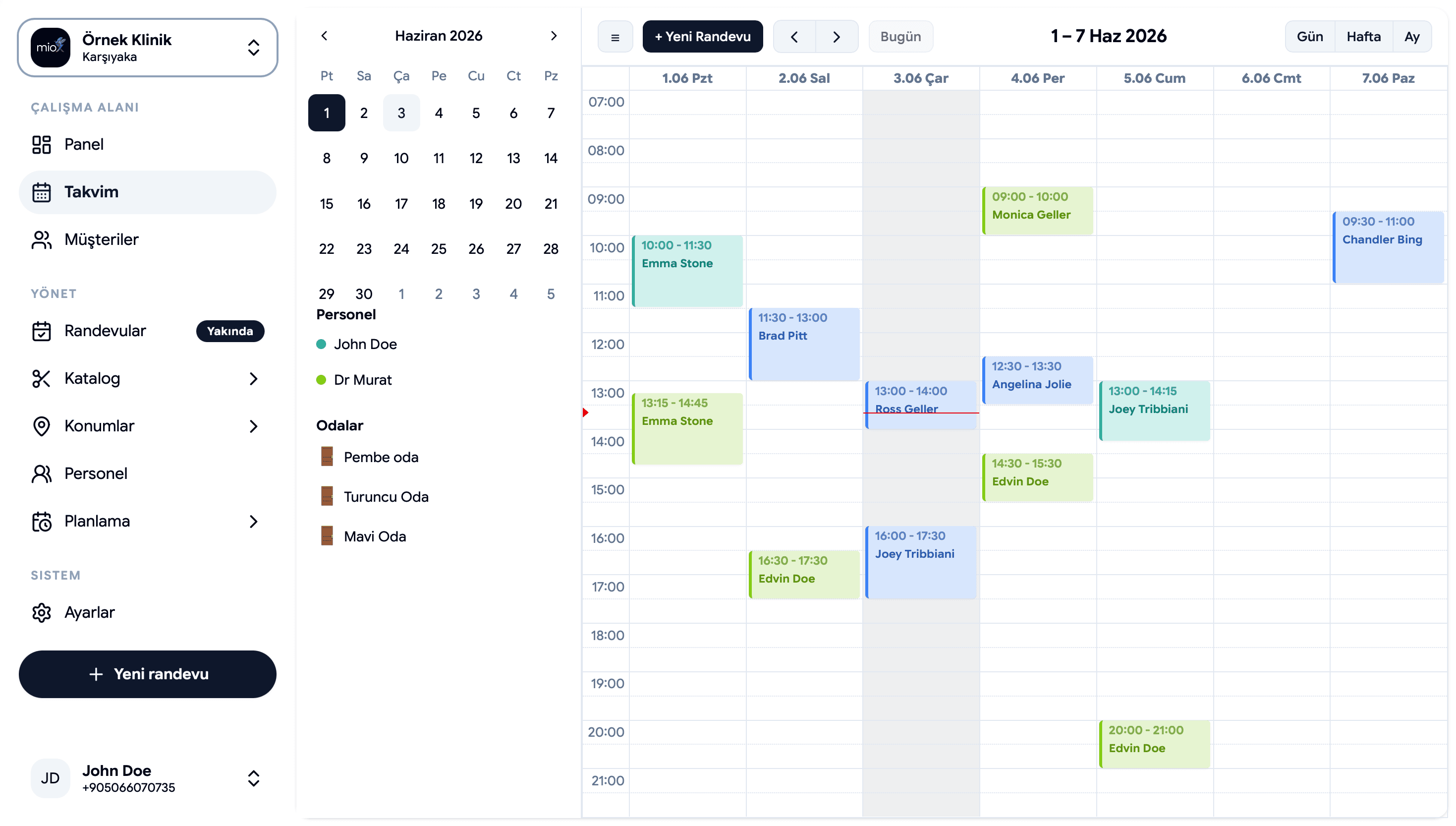
Everything starts with the calendar. In Calemio you set your working days, appointment lengths, and the buffer you want between two bookings once, and the rest just flows. Which slot is free, which is taken, it's clear at a glance.
The calendar syncs in real time across iOS, Android and the web portal. Book something from your phone in the morning, open your laptop that afternoon, and it's already there. No double-entry, and no double-booking either: once a slot is filled, it can't be picked again, so the nightmare of two clients landing on the same hour never gets started. If you're new to the product, what Calemio is is a good place to begin.
Online Booking Link
Your clients shouldn't have to phone you. You share your own booking link, and the client sees your open slots around the clock, even outside your working hours, picks one, and gets an automatic SMS confirmation on the spot.
The best part is this: a booking drops in at 11 PM, and when you open the app in the morning it's already sitting in your calendar. We go into how it works, and what it changes, in the online booking link piece.
Automated Reminders (SMS and WhatsApp)
The no-show is the quiet cost line of any appointment-based business. Calemio sends an automatic reminder 24 hours and 2 hours before the appointment, over SMS and WhatsApp. You don't type them one by one, and the client doesn't get to say "I forgot."
And it isn't one-way. The client confirms or reschedules with a single tap; you just see the outcome. That half hour a day you'd spend texting people stays in your pocket.
Mio: The AI Assistant
Mio works like your business's digital receptionist. It speaks in plain language: say "book Mr. Demir for Tuesday at 2 PM" and Mio holds the slot, then sends a registration form if the client is new or a confirmation message if they already exist. You can use voice commands and reschedule on the fly.
Mio takes over confirmations and no-show follow-ups, speaks the client's language, respects quiet hours, and pulls up the relevant client's history before the appointment. Full Mio (voice plus rescheduling) is part of the Pratik plan. We covered exactly what Mio does in depth in its own article.
Digital Client Records and OCR Import
Every client gets a single digital card: contact details, visit history, notes, all in one place. That illegible "A.Y." in the notebook finally gets tied to a proper record.
But what about your old data? You don't have to re-key it. Upload a photo of the old ledger, an Excel file (.xlsx), or a PDF, and the AI reads it with OCR, classifies it, and automatically matches names, contacts and visit history. Hundreds of records from a single spreadsheet (say, 186 clients) can land in the system in seconds. We walk through the whole migration in from paper notebook to digital calendar.
Form and Note Templates
Every business has its own questions and its own flow. In Calemio you build custom form and note templates: an intake form that goes to the client when they book, a note template you fill in during the visit, fields specific to your work. Not a generic "notes box," but structures shaped around what you actually do.
Revenue and Occupancy Reports
"How did this month go?" stops being guesswork. Calemio lays out metrics like weekly and monthly appointment counts, occupancy rate, and revenue as clear charts. Which days run hot, which hours sit empty, how income is trending, all on one screen.
These aren't just numbers, they're a decision tool. You see the empty afternoons, and you plan your promotion around them.
Multi-Business and Branches
There are two separate needs here, and it's worth not mixing them up.
For independent businesses (Workspaces). If you run more than one separate business, each gets its own Business Account, and client data stays isolated from the others along the KVKK/GDPR line: one account's data never leaks into another. You switch in seconds from the account badge in the top corner. Because the calendars talk to each other in the background, double-booking protection is still in play. One subscription, unlimited businesses.
For chains (Pro). If you manage connected branches of the same brand, Pro steps in: shared client records, appointment transfer between branches, unified reporting, role-based permissions (staff/manager/reception), commission tracking, and per-branch revenue. To put the distinction simply: independent setups belong in Workspaces, connected chain branches belong in Pro.
Security and KVKK
Client data is a sensitive thing to hold, and Calemio treats it that way: two-layer AES-256 encryption, both at rest and in transit, over TLS 1.3. Your notes are stored with a zero-knowledge architecture; the encryption key lives only on your device, so not even the Calemio team can read them.
Calemio is KVKK- and GDPR-compliant by default (not a setting you switch on later). A Data Processing Agreement (DPA) is available on request. Your data is kept in secure data centers, can be exported whenever you want, and belongs entirely to you.
All in one app
Calendar, online booking, reminders, Mio, records, reports and security. No hopping between separate tools, it's all in one place, in real-time sync.
Where to Start
Calemio is currently in Beta, live on the App Store and Google Play and working alongside the web portal. The free plan is free forever, enough for a personal calendar view and seeing the appointments assigned to you. The full feature set (full Mio, SMS and WhatsApp reminders, templates, reports) sits in the Pratik plan, starting at ₺1,999/mo. You begin with a 14-day free trial, no credit card needed. It's worth checking the app for the current price.
In short: hand the admin to Calemio and turn back to your clients. You can start a free trial.
Frequently Asked Questions
What do I get on the free plan, and what do I pay for the full feature set?
The free plan is free forever and covers a personal calendar view plus the appointments assigned to you. Full Mio, SMS and WhatsApp reminders, templates and reports sit in the Pratik plan, starting at ₺1,999/mo. You can start with a 14-day free trial, and no credit card is needed.
Could I accidentally end up with two clients booked into the same hour?
No. Once a slot is filled it can't be picked again, so double-booking never gets started. And because the calendar syncs in real time across iOS, Android and the web portal, an appointment you book on your phone in the morning is already waiting on your laptop that afternoon. Even with several businesses, the calendars talk to each other in the background.
When do the reminders go out, and can the client reply to them?
Calemio sends automatic reminders 24 hours and 2 hours before the appointment, over SMS and WhatsApp, so you never type them one by one. They aren't one-way either: the client confirms or reschedules with a single tap, and you just see the outcome.
Do I have to re-type my old notebook and spreadsheet records by hand?
You don't. Upload a photo of your old ledger, an Excel file (.xlsx) or a PDF, and the AI reads it with OCR, classifies it, and automatically matches names, contacts and visit history. Hundreds of records from one spreadsheet, say 186 clients, can land in the system in seconds.
I run more than one business. Should I be on Workspaces or Pro?
If your businesses are separate and independent, go with Workspaces: each gets its own Business Account, client data stays isolated from the others, and one subscription covers unlimited businesses. If you manage connected branches of the same brand, Pro is the fit: shared client records, appointment transfer between branches, unified reporting and role-based permissions.
Can the Calemio team read my client notes?
No. Your notes are stored with a zero-knowledge architecture, and the encryption key lives only on your device, so not even the Calemio team can read them. Data is protected by two-layer AES-256 encryption at rest and in transit, over TLS 1.3. Calemio is KVKK- and GDPR-compliant by default.
Related articles



Try Calemio for free
Encrypted, compliant and simple. Built for independent therapists and clinics.
Start free